
Sign a request and validate the signature
To ensure the security of message transmission, the merchants or ISVs (independent software vendors) must properly execute message signing and signature validation.
Before you begin
Before performing message signing and signature validation, complete the following steps:
Create private key and public keys
Private keys must be securely stored on backend servers with appropriate access controls, as leakage can lead to significant loss.
# 1. Generate private key
openssl genrsa -out client_private_key_php_dotnet.pem

# 2. If you are a Java developer, you need to convert the private key to PKCS8 format
openssl pkcs8 -topk8 -inform PEM -in client_private_key_php_dotnet.pem -outform PEM -nocrypt -out client_private_key_pkcs8.pem

# 3. Generate public key
openssl rsa -in client_private_key_php_dotnet.pem -pubout -out client_public_key_php_dotnet.pem

# 4. Generate private key suitable for Java
cat client_private_key_pkcs8.pem | grep -v "^\-" | tr -d "\n" | sed 's/%$//' > client_private_key_java.pem

# 5. Generate public key suitable for Java
cat client_public_key_php_dotnet.pem | grep -v "^\-" | tr -d "\n" | sed 's/%$//' > client_public_key_java.pem
Public key example:
MIIBIjANBgkqhkiG9w0BAQEFAAOCAQ8AMIIBCgKCAQEAp8NrCn0KW+saBb2voLX5cDVeQ/HaVquM3OCt12D7a30VutARr9P8qSVSE90IqUkmmkcpFSdf61yYOF+lAvGYLRrmxmIGjF9G1BVUvJJdfO/ZN8x5OS2+F7AclaLZHRfjZ/mIKkQIMUUcgUUNKgXv4SwxOkZcMAL2tFJsrTlwdciPLxcAzKqEgLpIHqN+BQdI1sDkfr5+q0IEA3B+fiVgRUeyeL0L0qSp3DBbj/iSuWXjd0uelLmUiMNdVle2TsnaXMBwG5jVXHmar96fZKuduJK5mrGo88AYQr0hjLTF3B45FYsRfWeBfmUjTRpJEhA91y9AdqEl8JsPvCfa32vzxQIDAQABExchange public keys with Alipay
The merchant or ISV should send the generated public key to Alipay via email or other secure means, while retaining the private key for signing purposes. In return, Alipay will send its public key to the merchants or ISV using secure communication.
Sign a request
Each request sent to the Alipay server must comply with Alipay's data security transmission specifications. It is recommended to use the Alipay Open-SDK for handling and verifying the signature. Once the request is sent, the Alipay server will validate the signature to ensure the authenticity of the merchant or ISV and the integrity of the message content.
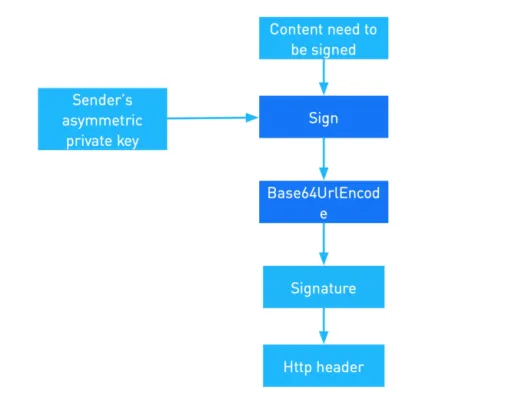
Construct the content to be signed
Take a request as an example, which includes the following properties:
HTTP URI WITH QUERY STRING: /amsin/commercial/certificate/acceptClient-Id: T_111222333Request-Time: 2019-10-22T01:19:50+08:00HTTPBODY: The following code sample describes the body format. For example:
{
    "merchantId": "123456789",
    "requestId": "550e8400-e29b-41d4-a716-446655440000",
    "outTransId": "123456789_RENEWAL20250909105104279487",
    "entityId": "12345678900",
    "entityType": "phone",
    "transType": "transaction",
    "transDate": "2025-04-05T06:30:00Z",
    "transStatus": "Success",
    "tradeAmt": "{\"currency\":\"HKD\",\"value\":\"24800\"}",
    "extendInfo": "{\"changeCentFlag\":true,\"goodsInfoList\":[{\"goodsId\":\"123456789_RENEWAL20250909105104279487\",\"goodsCode\":\"RENEWAL\",\"goodsName\":\"\u8054\u901a\u5408\u7ea6\u7eed\u7ea6\",\"goodsPrice\":{\"currency\":\"HKD\",\"value\":\"24800\"}}]}"
}
By complying with the Syntax of content to be signed, the content to be signed is created as follows:
POST /amsin/commercial/certificate/accept
T_111222333.2019-12-08T03:31:41-08:00.{
    "merchantId": "123456789",
    "requestId": "550e8400-e29b-41d4-a716-446655440000",
    "outTransId": "123456789_RENEWAL20250909105104279487",
    "transType": "transaction",
    "transDate": "2025-04-05T06:30:00Z",
    "transStatus": "Success",
    "tradeAmt": "{\"currency\":\"HKD\",\"value\":\"24800\"}",
    "extendInfo": "{\"changeCentFlag\":true,\"goodsInfoList\":[{\"goodsId\":\"123456789_RENEWAL20250909105104279487\",\"goodsCode\":\"RENEWAL\",\"goodsName\":\"\u8054\u901a\u5408\u7ea6\u7eed\u7ea6\",\"goodsPrice\":{\"currency\":\"HKD\",\"value\":\"24800\"}}]}"
}
Syntax of content to be signed
<HTTP METHOD> <HTTP URI WITH QUERY STRING>
<Client-Id>.<Request-Time>.<HTTP BODY>
Field name | Description |
HTTP-METHOD | The HTTP method, such as POST or GET. |
HTTP URI WITH QUERY STRING | The {endpoint} portion of the URL. For example, if the URL is https://open.alipay.hk/amsin/commercial/certificate/accept, the value is /amsin/commercial/certificate/accept. |
Client-Id | A unique client identifier, for example, T_111222333. |
Request-Time | The time the request is sent, for example, 2019-10-22T01:19:50+08:00. |
HTTPBODY | The request body. |
Calculate and generate the signature
A signature is generated by obtaining a hash value from the content to be signed using a hashing algorithm. This hash value is then encrypted to produce the signature.
Signature calculation:
Signature = base64UrlEncode(sha256withrsa(Content_To_Be_Signed))
Methods that are used:
sha256withrsa: The method to generate a digital signature for the content provided.base64UrlEncode: The method to encode the generated digital signature.
Input parameters:
Content_To_Be_Signed: The content to be signed that is obtained in the previous step.
Sample generated signature:
VrcC16qhJ%2FIBEVT6nyvjn9y%2FO9AU1ap%2BIH1xEsq8dyVt7h8KMM7YQtjQOrukHkiOicZPyGkB4ZlcQQy5K%2F%2BQzX0LGvVMHT3ijoJ4ZNzwqDAFN9Hfnlz5hdeYHVev3AS47gsbZb%2BCpeFwH4SOZxhXTJ7%2FWn4TExg9s5w5sgbl1P0cmbiYfYpkWBTCqvFzb4pqpXgrBUw%2FFWl%2F1GAN9o2q9uXGcgF35lkN%2F2kLBDhkYvE25Z86bQQCsKD%2FftKBqHioYT6P5t%2FSZPSO1dBKGr9LHybPY3YvySccjg94LRDAjs3Kw5BDFR2tyO6%2FHDItHLw49%2F2U6AM6WVRmuSE4D8eWpA%3D%3DWhen sending a request, assemble the signature algorithm, the key version, and the signature into the HTTP request or response headers:
"Content-Type": "application/json",
"Request-Time": "2019-07-12T12:08:56+05:30",
"client-id": "T_111222333",
"Signature": "algorithm=sha256withrsa,keyVersion=2,signature=VrcC16qhJ%2FIBEVT6nyvjn9y%2FO9AU1ap%2BIH1xEsq8dyVt7h8KMM7YQtjQOrukHkiOicZPyGkB4ZlcQQy5K%2F%2BQzX0LGvVMHT3ijoJ4ZNzwqDAFN9Hfnlz5hdeYHVev3AS47gsbZb%2BCpeFwH4SOZxhXTJ7%2FWn4TExg9s5w5sgbl1P0cmbiYfYpkWBTCqvFzb4pqpXgrBUw%2FFWl%2F1GAN9o2q9uXGcgF35lkN%2F2kLBDhkYvE25Z86bQQCsKD%2FftKBqHioYT6P5t%2FSZPSO1dBKGr9LHybPY3YvySccjg94LRDAjs3Kw5BDFR2tyO6%2FHDItHLw49%2F2U6AM6WVRmuSE4D8eWpA%3D%3D
Send a request
Construct a request by adding the Client-Id, Request-Time, Content-Type, and Signature fields to the request header. After a request is constructed, you can send the request.
Request header
    "Content-Type": "application/json",
    "Request-Time": "2019-07-12T12:08:56+05:30",
    "client-id": "T_111222333",
    "Signature": "algorithm=sha256withrsa,keyVersion=2,signature=VrcC16qhJ%2FIBEVT6nyvjn9y%2FO9AU1ap%2BIH1xEsq8dyVt7h8KMM7YQtjQOrukHkiOicZPyGkB4ZlcQQy5K%2F%2BQzX0LGvVMHT3ijoJ4ZNzwqDAFN9Hfnlz5hdeYHVev3AS47gsbZb%2BCpeFwH4SOZxhXTJ7%2FWn4TExg9s5w5sgbl1P0cmbiYfYpkWBTCqvFzb4pqpXgrBUw%2FFWl%2F1GAN9o2q9uXGcgF35lkN%2F2kLBDhkYvE25Z86bQQCsKD%2FftKBqHioYT6P5t%2FSZPSO1dBKGr9LHybPY3YvySccjg94LRDAjs3Kw5BDFR2tyO6%2FHDItHLw49%2F2U6AM6WVRmuSE4D8eWpA%3D%3D
Request body
{
    "merchantId": "123456789",
    "requestId": "550e8400-e29b-41d4-a716-446655440000",
    "outTransId": "123456789_RENEWAL20250909105104279487",
    "entityId": "12345678900",
    "entityType": "phone",
    "transType": "transaction",
    "transDate": "2025-04-05T06:30:00Z",
    "transStatus": "Success",
    "tradeAmt": "{\"currency\":\"HKD\",\"value\":\"24800\"}",
    "extendInfo": "{\"changeCentFlag\":true,\"goodsInfoList\":[{\"goodsId\":\"123456789_RENEWAL20250909105104279487\",\"goodsCode\":\"RENEWAL\",\"goodsName\":\"\u8054\u901a\u5408\u7ea6\u7eed\u7ea6\",\"goodsPrice\":{\"currency\":\"HKD\",\"value\":\"24800\"}}]}"
}
Handle a response
After you receive a response, you need to validate the signature of the response.
{
  "invokeResult": "SUCCESS",
  "success": true
}
Validate the signature
Merchants or ISVs can verify responses from Alipay servers to confirm Alipay's authenticity and ensure message content has not been modified.
Signature verification consists of three steps: obtaining the key required for signature verification, obtaining the content to be verified, and verifying the signature.
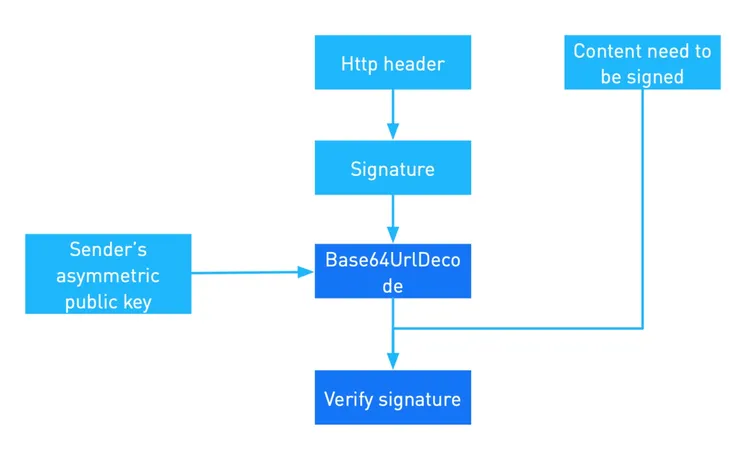
1. Obtain the key required for signature verification
Retrieve the clientId and key version from the HTTP header. Use these to obtain the public key for verification. If the key version is not specified, the latest key is used by default.
2. Obtain the content to be verified
<HTTP METHOD> <HTTP URI WITH QUERY STRING>
<Client-Id>.<Response-Time>.<HTTP BODY>
For the content format of signature verification, there are two differences from signing:
- Response-Time: The time when Alipay responds (available in the HTTP header).
- HTTP BODY: The JSON body of Alipay's response.
3. Verify the signature
Obtain the signature algorithm from the HTTP header. Verification involves obtaining the hash value of the content to be verified using a hash algorithm, decrypting the signature, and checking if the decrypted content matches the hash value.
Example (RSA256)
Decode the signature by using base64UrlDecode, then verify the signature by using the sender's public key and sha256withrsa.
Response header
Content-Type:application/json; charset=UTF-8
response-time:2019-10-24T16:31:52-07:00
client-id:T_111222333
signature:algorithm=RSA256,keyVersion=2,signature=TgpjpAzwmA7aWDloDEitOpYv...
Response body
{"invokeResult":"SUCCESS","success":true}Content Example
POST /amsin/commercial/certificate/accept
T_111222333.2019-10-22T01:19:50+08:00.{"invokeResult":"SUCCESS","success":true}
Validate signature using SDK
You can also utilize the SDK to verify the signature as follows:
boolean isSuccess = SignatureTool.verify(content, signature, alipayPublicKey);